 Number 231 - July 2002 |





|
| Blind Copies in Internet Explorer E-Mail | |
| by Bob Thomson | |
|
Q. How do I make
blind copies in my e-mails? I am using Internet Explorer 5. I have been
told that the Bcc: line should come up just below the Cc: line in the
message window but I can't make this happen in my version.
The question was asked at the June TOG meeting, and although many of those present use the blind copy (Bcc:) feature, no one at the meeting could explain how to activate the Bcc: line in an e-mail message if it presently is not active. After a few shrewd search entries in our favorite search engine, Google, we have the answer. A. This is a good question especially if you have been bothered by those messages that have been forwarded about sixteen times and carry the mailing lists of everyone and his brother who forwarded it previously. The sender can avoid that annoying faux pas by placing those names in the Blind Copy (Bcc:) line of the e-mail. Here is what to do: Click on New Mail. When the New Mail window opens it will probably have just the To: and Cc: lines showing above the Subject: line. On the top margin of the window you will see the choices File, Edit, View, Insert, Format, Tools, Message, Help. Although it does not seem intuituve to me, the area to select is View. Click View then All Headers from the drop down menu, again not very intuitive. 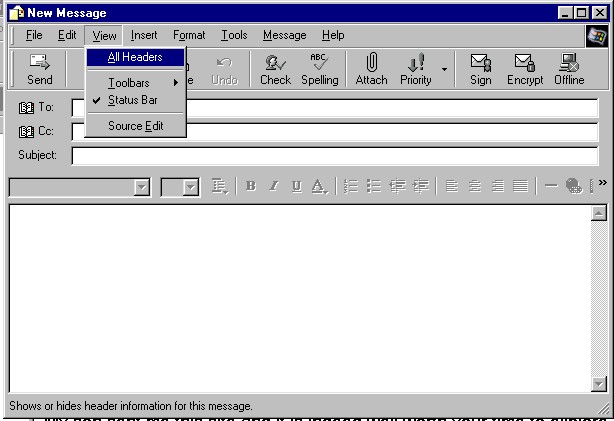
|
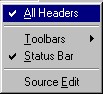
A check mark will appear on the All Headers
line and the Bcc: line should appear below the Cc: line in your New
Message window. The Bcc: line will continue to appear in future New
Message windows until you repeat this procedure and click All Headers again when it will become unchecked and will revert to showing only the Cc: line.
But there is an even simpler way... When the new mail window opens, double click on the Cc: line and a new window opens which allows you to place names in both the Cc: and Bcc: windows. 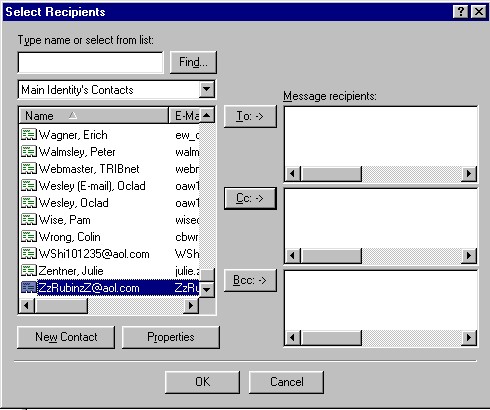
|
|
Number 231 - July 2002
|
|