 Number 318 - November 2009 |





|
| What If? | |
Computer Club of Menifee Valley newsletter, Editor Frank Varano, August 2009
 | |
|
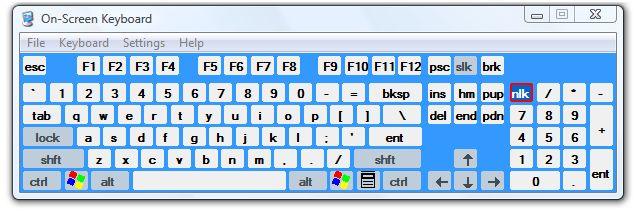
Do you know what this is?
Of course, it is obvious. It is a keyboard display. But why do I show it
here? And how did I get the picture? It is my way of sneaking into the
subject of identity theft.
As you well know by now identity theft is a big problem and a big worry for all of us. Every time you sit at the computer to buy anything on line or pay bills on line or do any banking transactions that involve the use of the keyboard and passwords, you are at the mercy of malware programs which may be on your computer. And you know also that your passwords are lousy, Aunt Gertrude as a password is easy to remember. And it is also easy to guess. I wrote about generating passwords in another issue of this newsletter in 2008. So What Can You Do About It? Even a strong password can't protect you when hardware and software is designed to surreptitiously copy your keystrokes. A writer (Becky Waring) said that Google's Gmail service allows hackers to try to guess your password 1200 times a day. So what can you do? In Windows System 32 'directory' there is an executable program osk.exe (On Screen Keyboard). My mistress, Reba told me about it. She said that she 'didn't want nobody' to see our steamy communication. Let's all thank her. This tool prevents some types of hardware keyloggers from detecting signals from the actual (physical) keyboard. Please be aware that using the On Screen Keyboard does not protect you from Software keyloggers. Keyboard action is essentially the same as using the keyboard. Where can I use this keyboard to protect my identity? Well, I'd say use the On Screen Keyboard when you are using a public computer in a public place because you can't detect whether a public or unsecured computer has a hardware or software keylogger or both. My own recommendation is to never do your critical banking except at home. It isn't likely that your own computer at home would have a hardware type of keylogger. (Especially if you are up-to-date on your anti-malware and anti-virus software. At best you can only minimize the risk. And that is unsatisfactory, says Reba.) How about the software keyloggers? There are some programs but I find them unsatisfactory. I think it is best not to use the keyboard to enter passwords. No, you don't have to use telepathy. I'll give you two methods. Method 1 Put your passwords on a USB storage device. When you need them insert the device in a USB drive and open the file that has the passwords. Then copy and paste the password. Better still, select the password and drag and drop. (You may not be able to do this in all cases.) See? No keystrokes are used. Method 2 Use some software that stores your password encrypted, like Roboform and Billeo. There are others. These software insert the password automatically or at your direction when the occasion arises. I have used Method 2 for years. My mistresses are fussy about using a password to access their websites. Especially Reba. The big advantage of Method 2 is that it can store much more information besides passwords. I am talking about things like names, addresses, telephone numbers, and even credit card numbers. A source that I used for some of the above information suggests a complicated routine (called the Vesik method). I think it is far too detailed a procedure to use routinely. It is an open invitation to be careless and defeat your objective of a secure sign in. If you are in a public place using a public computer, Method 1 is best. Just don't forget to take your USB thumb drive with you when you leave. Some of these software systems also encrypt the password on the thumb (USB) drive. This is the end of what I have to say about this subject of keyloggers per se. (Now,) Let's talk about passwords again. |
I'll repeat what I wrote some time ago about passwords. Here is a scheme which I think is pretty good. Of course, I am unabashedly biased. If you don't have a software to keep track of them then you need a system which will give you a pretty secure password. Here's how it goes. Make (at least) an eight character 'base' or 'core' password, like 6y$m9#z5. You can either memorize it or just write it down all by itself; stick it under your keyboard. Or whatever. You have only to remember or keep close track of this core password. Separately, I want you to keep a list of characters you must add to the front and to the end of this core password to make a complete password for the various places where you will need them. To illustrate, let's say that you use the above core password along with other letters or characters to identify your access to your Bank of America account. In front of the core password, add bao and at the end of it add fam. Really you are splitting BAofAM and adding part to the front and part to the end of the core password. You only need to look at it to know where that password must be used. Obviously you can split the added letters any way you wish to make up the complete password. I know that it may be a pain in the neck to type the added characters at the beginning and the end. Why not just put it all letters at the end or the beginning? The purpose of this system is to give you some security in your passwords. The only problem remaining is to try to use Method 1 to enter the password in the password block. There are five situations where passwords are needed. 1. Free subscriptions 2. Paid subscriptions. 3. Financial 4. Access to computer functions like logons and screen saver. 5. To authorize acess to confidential or proprietary files. As far as I am concerned in the first two I can use a name (like the names of my mistresses). Normally subscriptions to a newsletter or a health site or other sites that are not important as far as security is concerned. I personally use the same password for all of 1 and 2. And I memorized it. It is also logged in a card file. The third one pertains to your own finances, like brokerage accounts, etc. where the password is more critical. This where the information in this article is needed. The fourth one does not posea keylogger problem. The password must protect your computer (for example) from unauthorized access to keep your laptop from being useful to anyone who steals it. It is best to have a separate password for it. But for heaven's sake store it someplace! I had to do a password recovery for a laptop owner. The job paid me nicely. The fifth one poses a different kind of problem. There are two situations to deal with. A. If it is a total proprietary file that is strictly for your eyes only, you can use anything that helps you remember it. From my experience it is for protection against other family members. B. In industry, on a company network, for example, passwords can be assigned to those who are authorized access in order to control access and to identify those who used the access. There is no point in dwelling on this here. There is no shortcut or link to this executable file. You gotta dig for it. You can access it by using the Run command. How? Click on Start the Run and type Cmd and click OK. Then type osk at the prompt on the black screen. You'll get this window and the On Screen Keyboard shown at the top of this page will appear. 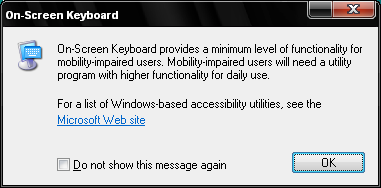
Ironically, this function (though obscure) is intended by Microosoft for the "Mobility Impaired users." |
|
Number 318 - November 2009
|
|