 Number 316 - September 2009 |





|
| How To Spot a Phishing Email | |
|
Front Range PC Users Group newssetter k-bytes, May 09 Extracted from PayPal Security Center web page. Thanks to Linda Gonse, Orange County IBM PC Users Group, http://www.orcopug.org for locating this information. | |
|
There are many telltale signs of a fraudulent email. How to spot a spoof (fraudulent) website. 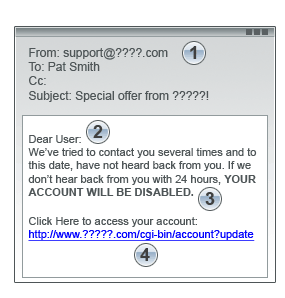
A phishing email will usually try to direct you to a fraudulent website that mimics the appearance of a popular website or company. The spoof website will request your personal information, such as credit card number, Social Security number, or account password. You think you are giving information to a trusted company when, in fact, you are supplying it to an online criminal. Be cautious. Some fraudsters will insert a fake browser address bar over the real one, making it appear that you're on a legitimate website. Follow these precautions: Even if an URL contains the word "PayPal," it may not be a PayPal site. |
https://www.paypal.com/=cmd_login_access" Make sure there is a secure lock icon in the status bar at the bottom of the browser window. Many fake sites will put this icon inside the window to deceive you. Thanks to PayPal for posting these tips. You can find more about phishing and fraudulent websites on the PayPal Security Center web page https://www.paypal.com/us/cgi-bin/webscr?cmd= xpt/marketing/securitycenter/general/RecognizePhishing-outside --LG. Suggested by Mary Burton. (k-byte Editor's Note: These additional resources (also thanks to Linda) for this topic are recommended: 06/technology_how_to_spot_a_phish/html/2.stm Phishing mail often includes official looking logos and other identifying information taken directly from legitimate Web sites, and it may include convincing details about your personal information that scammers found on your social networking pages. The main thing phishing e-mail messages have in common is that they ask for personal data, or direct you to Web sites or phone numbers to call where they ask you to provide personal data. spooftutorial/index.html#learn_more securityand safety/a/phishingscams.htm The best way to avoid becomimg a phishing scam victim is to use your best judgment. No financial institution with any sense will email you to input all of your sensitive information. In fact, most institutions are informing customers that "We will never ask you for your personal information via phone or e-mail." |
|
Number 316 - September 2009
|
|