 Number 310 - March 2009 |





|
| File Naming and Online Forums | |
| by Elizabeth B. Wright, Computer Club of Oklahoma City | |
|
Some tips that have been around a long time might bear repeating. Now that many of us are storing digital images on our hard drives, we often find a way to rename files with something resembling the content of the pictures. Most of us assume that the numbering begins with 1 and goes up from there. But early in computer history, programmers used a formula for sorting files that caused problems for average users ever since. I'm talking about the numbers 1 to 9, then from 10 on up. I have used the generic "file" in my illustration. But if these files were from a vacation I would probably used something like "2009beach1.jpg". The picture below will show how the computer handles files numbered the way we were taught as children to count. Note that the list starts with one, but goes next to 10, It follows that sequence until it reaches 19. At that point it starts with 2., then immediately follows with 20 and sorts the list until it reaches 29, This process us repeated on up the scale, 3, then 30 to 39, 4, then 40 to 49, etc., sorting whatever number of files are in the list. 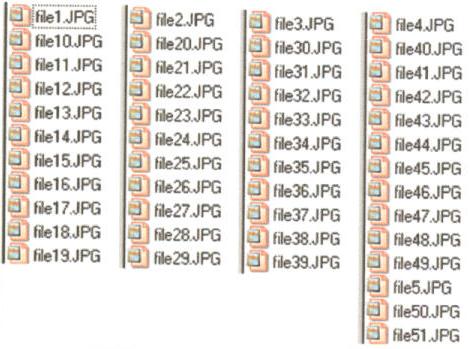
|
The work around for this problem is to add leading zeroes to our file numbers. For some reason known only to hard core programmers, this method tricks the computer into sorting our files in the sequence we expect. Of course there are all those zeroes, but most of us have learned to live with that. So, to rename this same list we would first determine how many files are in the list and add leading zeroes enough to cover thatnumber. In this case, our files do not exceed two digits so we would only have to add one zero to file 1 through 9 in order to make the sort work out. Starting wtth the number one file, we would rename it to file01.jpg. Add one sero to the numbers 1 through 9 and nothing to the double digit numbers thereafter. So after file09.jpg we would next see file10.jpg. If more than the required number os zeroes are added the computer again does its own thing and you are left with a different mess. Add only the number of zeroes to maintain the order you want to achieve. If you have 1000 files, then you want to end up with the filename ending in 1000. To do so you would start with 0001. Apparently the computer can count from 0001 to 9999. Keeping files in the digital order in which they were created is handy when looking for a particular picture. In large groups of pictures, I like to keep them in proper sequence so that when I look for an image I expect to find it in its place. It just makes life easier. Now for an Internet tip. One advantage to using the Internet is access "forums" on just about everything. Our study group leader in the MS Office suite found a very amazing solution to one of our members' question about Excel. The formulae (there were several) needed to fix his spreadsheet problem were so complex that we agreed only a true programmer could have come up with them. By going to the forums online Randy (our leader) found someone who had an almost identical problem and the answer was forthcoming from someone else who contributes to the forum. I guess the next step for all of us is learning to use the forums. Of course, attending study groups offered by the CCOKC is the most amazing way to keep up with computing in the 21st century. Check them out. |
|
Number 310 - March 2009
|
|