 Number 309 - February 2009 |





|
| Irfanview 4.0 - Freeware Image Editor and Media Player | |
|
by Ira Wilsker | |
|
Imagine a free (for non-commercial use), full featured utility that can display and edit almost all known image formats, and convert from any one format to any other. Imagine a utility that can play almost every known audio and video format with its free "Plugins" file, all in a small and very efficient software package. Some skeptics may say that this sounds too good to be true, but lucky for us, it is indeed true. The program that can do all of the above, and more is the very popular Irfanview, version 4.0 ( 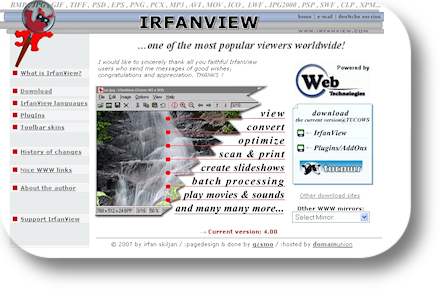
People send me several emails every day with images or videos attached, and I have Irfanview set as my default viewer and player for almost all images, audio files, and videos. Using Irfanview is fairly simple, straight forward, and somewhat intuitive. After downloading ( One frequent function that I use Irfanview for on a regular basis is image editing. Recently, a relative sent me several unedited JPG digital photos of her new puppy taken at maximum resolution with a 6 megapixel digital camera. Each image was huge both in file size (several megabytes), and in viewing size. I have a big-screen monitor running at a high screen resolution, and still could not view the entire image without scrolling, as the image size was greater than my monitor resolution. Since I opened the attached images in Irfanview, it was but a few mouse clicks to edit them down to a more manageable size; I clicked on IMAGE-RESIZE/RESAMPLE and then selected a percentage of the original size, and then saved 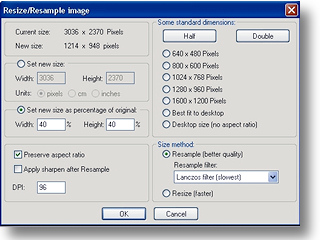
the image in its reduced size. It is good netiquette to reduce the size of multi-megapixel images, and then email the digital images in a more reasonable size such as 800x600 or 1024x768. It is also good netiquette to crop the image, which can be dome simply by clicking and holding the left mouse button on a corner of the desired image, and then dragging it in a frame to the desired borders of the cropped image. EDIT - CROP SELECTION will instantly produce the cropped image which can be saved or further edited. |
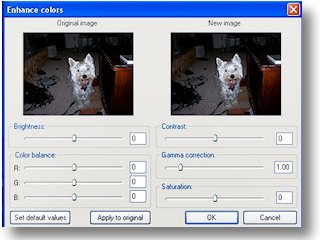
Another purpose of Irfanview is to improve the quality of digital images by enhancing the colors. The command IMAGE - ENHANCE COLORS opens a dual pane window that shows the unedited original image and the new image with the changes applied. Possible changes that can be made include brightness, contrast, color balance, gamma, and saturation. By using a slider or manually entering values allows the user to see the effects of any changes before saving the edited image. Another selection I often utilize is the "sharpen" command on the image menu; this automatically sharpens a fuzzy image. Other image commands include red-eye reduction, and a panorama function where separate images can automatically be knit together to make a larger panoramic image. 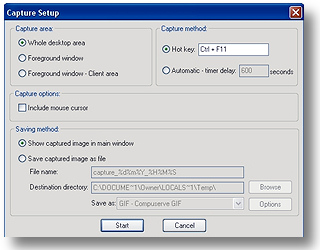
Readers of this column will notice that sometimes images are displayed along with the text. Most of these images are screen captures made with Irfanview. By selecting OPTIONS - CAPTURE/SCREENSHOT a hot key is then used to capture the image on the monitor. I use the default hotkey (Ctrl-F11) for image capture, crop the image as desired, and then save it in the desired format. While there are many other image editing features included in the program, Irfanview also shines as an audio and video player if the plugins are installed. Popular audio formats, such as MP3, RA, and WAV are fully supported, allowing this single program to play almost any audio format, with full control of volume and other technical details. There are many video formats in common use, such as MPEG, AVI, and WMV that are often used for the videos that people email or display on a webpage, and Irfanview can handle almost all of them interchangeably, and can serve as an able substitute for Windows Media Player, and most other media players. Audio and video on CDs and DVDs can also be played with Irfanview. Irfanview 4.0 will work well on all versions of Windows from 95 to Vista, and is simple enough for beginners, and sophisticated enough for professionals. The software is free for non-commercial use, and the author encourages purely voluntary contributions via PayPal. I suggest that readers of this column download it and try it. There is no adware or spyware embedded in it, and the program has a clean and uncluttered interface. I have personally used Irfanview on an almost daily basis on all of my computers for several years, and can strongly recommend it. Try it, and you may end up liking it as much as I enjoy Irfanview. This article has been provided personally by the author solely for publication by APCUG member groups. All other uses require the permission of the author (see e-mail address above). |
|
Number 309 - February 2009
|
|