 Number 291 - August 2007 |





|
| A Slightly Faster and Safer Internet FREE! A small step for your PC, a giant leap for you | |
|
by Carey Holzman (Carey@ComputerAmerica.com), Co-host talk radio show | |
|
Author: The Healthy PC (McGraw/Hill); Smart Computing magazine (www.careyholzman.com). You may have never heard of a DNS before, but if you use the Internet, you use DNS all the time. DNS is short for Domain Name Server and I'm going to teach you what it does and why you should care. To understand what DNS is, let's start with something similar you are probably already familiar with--cellular phones. If you're like most people, you own a cellular phone. You probably have your friends and family programmed into your phone so all you have to do is find their name in your ,phone's contact list, or if you have fancy phone, just speak their name and the phone will dial them for you. In my phone, for example, I have Mom in my contact list. When I want to call Mom, I just search for her name in my phone and my phone knows to dial the number associated with that name. This is just like what a DNS does. When you type a web address into your Internet browser, such as Microsoft's Internet Explorer or Mozilla's Firefox, the DNS looks up the number associated with that name and then "calls" it. That number is called an IP Address, but it's really not all that different from a phone number. For example, if you go to www.google.com you are really going to 208.67.219.230. But that would be tough to remember, wouldn't it? Can you imagine if you had to remember 4 sets of numbers for each web-site you wanted to visit? What a nightmare! To make using the Internet simpler, all you need to know is the site's "name" and your Internet Service Providers DNS will look it up for you. The problem is that some Internet Service Providers DNS computers are out of date or over-worked. Others may be well maintained, but none of them do any filtering for you. If you were to receive an emall from your bank asking you to Verify your account or encouraging you to login to your account to resolve some issue, you may actually be taken to site that looks like your bank in every way, but isn't a bank at all. Instead, thieves have found a way to copy entire web pages, word for word and graphic for graphic, and place it on their own computers. They have a way to make the link you click on in the email take you to their site, instead of to your real bank. When you enter your account number and password, you are effectively telling them your account number and password. If you enter any other information about yourself, such as your first and last name, address, secret PIN for your debit card, social security number, mother's maiden name or other personally identifiable information about yourself, then you can kiss your identity goodbye. You've just given them all the information they need to fill out credit card applications, log into your bank and withdraw all of your funds or even get a job using your social security number, but never pay any taxes. All of which will have unfortunate and long term repercussions for you that can also be quite expensive and frustrating to fix. 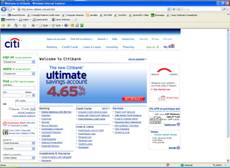
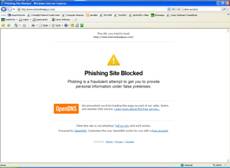
Above on the left, what a fraudulent web-site might look like without OpenDNS. The image, to right, is what a fraudulent web-site will look like with OpenDNS. |
We refer to this process of criminals obtaining your information in this manner as Phishing" (pronounced as "fishing.") Perhaps you're under the impression that if you don't click on any links in email (advice often offered as a security measure to prevent becoming a phishing victim) you'll be safe. But that's not guaranteed. Criminals have figured out ways to manipulate some DNS computers to take you to their site! Imagine if some one could change the number in your cellular phone for Mom, so that each time you went to call Mom, your phone dialed a l-900 number that charged you $2 per minute! When crooks manipulate a DNS computer in this manner, we refer to it as "DNS cache poisoning". Generally speaking, the Internet Service Providers are doing a great job of preventing their DNS computers from being compromised, but how can you be sure? Your Internet Service Provider has a lot of things to do besides maintain their DNS computer. They have email and spam to contend with and they may even provide cable TV , telephone or other services. So how much time and attention do their DNS computers receive? One company, OpenDNS.com www.opendns.com does nothing but maintain their DNS computers. In fact, they go a step further by filtering dangerous web-sites. If you were using their DNS computers, instead of the ones you are using right now, and tried to visit a fraudulent web-site masquerading as a financial institution in order to collect your personal information, it won't let you go there! What's more, OpenDNS.com offers their DNS computers free, for anyone to use, forever. Be cause their sole focus is on DNS, their computers are extremely fast and are updated constantly with new, dangerous web-sites to block. You don't have to install any software, sign any license agreements or even tell them who you are to take advantage of their free service. If you've ever thought your Internet was down, it may have only been that your Internet Service Providers DNS computers were unavailable for some reason. When the DNS computers are unavailable, your computer is unable to resolve the web addresses and it will appear as though your Internet connection is not working. OpenDNS.com has high performance DNS computers in numerous locations around the world to ensure reliability and speed. They are so proud of how reliable their system is, you can check the status of their entire system at any time. Curious? Click here http://system.opendns.com/ to see the current status of all of the OpenDNS computers (green = good, red or yellow = bad). If you choose to register with OpenDNS.com, which is also free, a few more features also become available to you. This may actually appeal more to a business owner than a home user, but if you're curious, it might be worth checking out as well. OpenDNS.com works with all computers, running all versions of Windows, Linux and even Apple PCs and gaming machines like the Xbox or PlayStation. It can also work within your router, and if your phone has Internet access, it can work with it as well! Best of all, they provide a free click-by-click walk-through www.opendns.com/start/ of how to configure it on all of these devices. Start Using OpenDNS If your computer runs any version of Microsoft Windows, you can quickly configure your computer to use OpenDNS by following a few simple steps that every one can easily understand right here www.opendns.com/start/windows.php. To learn more about how OpenDNS works, visit their Frequently Asked Questions www.opendns.com/faq/. If you want to learn more details of exactly how DNS works, visit (HowStuffWorks.com). This article has been provided to APCUG by the author solely for publication by APCUG member groups. All other uses require the permission of the author (see e-mail address above). |
|
Number 291 - August 2007
|
|