 Number 285 - February 2007 |





|
| If you're not sure of a program safety install & run in free sandboxie | |
| Orange County IBM PC Users' Group - December 2006 | |
|
When you run a program on your computer, data flows from the hard disk to the program via read operations. The data is then processed and displayed, and finally flows back from the progam to the hard disk via write operations. 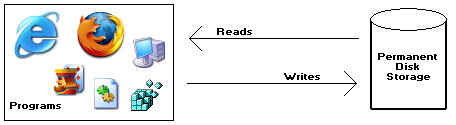
For example, if you run the Freecell program to play a game, it starts by reading the previously recorded statistics, displaying and altering them as you play the game, and finally writing them back to disk for future reference. Sandboxie, a free download from www.sandboxie.com, changes the rules so that write operations do not make it back to your hard disk. 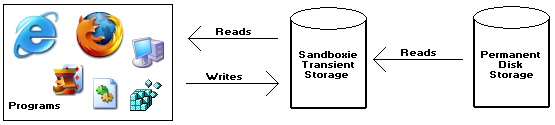
The illustration shows the key component of Sandboxie: a transient storage area, or sandbox. Data flows in both directions between programs and the sandbox. During read operations, data may flow from the hard disk into the sandbox. But data never flows back from the sandbox into the hard disk. The transient nature of the sandbox makes it is easy to get rid of everything in it. If you were to throwaway the sandbox, by deleting everything in it, the sandboxed statistics would be gone for good, as if they had never been there in the first place. |
You may want to run your Web browser inside the sandbox most of the time. This way any incoming, unsolicited software (spyware, malware and the like) that you download, is trapped in the sandbox. Changes made to your list of Favorites or Bookmarks, hijacking of your preferred start page, new and unwanted icons on your desktop--all these, and more, are trapped in and bound to the sandbox. You could also try a new toolbar add-on, browser extension or just about any kind of software. If you don't like it, you throwaway the sandbox, and start again with a fresh sandbox. On the other hand, if you do like the new piece of software, you can re-install it outside the sandbox so it becomes a permanent part of your system. Sandboxie intercepts changes to both your files and registry settings, making it virtually impossible for any software to reach outside the sandbox. Sandboxie traps cached browser items into the sandbox as a by-product of normal operation, so when you throwaway the sandbox, all the history records and other side-effects of your browsing disappear as well. Sandboxie Explained The October keyword was SANDBOXIE. It's a free download that provides many of the safe features of a "virtual pc" environment. You can safely surf the Internet and not worry about stuff being written to your hard disk. Sandboxie does not require disabling or blocking functions to Web sites through the browser. Instead, Sandboxie isolates and quarantines results of what the Web site may do to your computer, including installation of unsolicited software. There is no trade-off of functionality for security: the Web site can use the full range of active content tools, and if it uses these tools maliciously to install software or otherwise make changes in your computer, then these changes can be easily undone. Sandboxie intercepts changes to both your files and registry settings, making it virtually impossible for any software to reach outside the sandbox. Sandboxie traps cached browser items into the sandbox, so when you throwaway the sandbox, all the history records and other side-effects of your browsing disappear as well. Download Sandboxie from www.sandboxie.com. Source: www.it-observer.com/tools/25/sandboxie/ |
|
Number 285 - February 2007
|
|