I was helping a fellow club member resolve a printer problem when I found that the item "Printers and Faxes" did not show up on his Start Menu. On my computer, when I right-click on Start, I get the following menu:
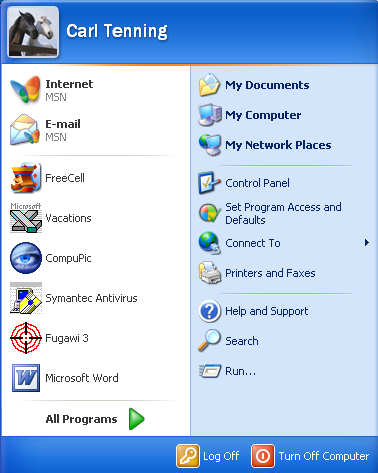
|
As it turned out, the printer problem was with a disconnected printer cable. However, when the cable was reconnected, the printer began printing a lengthy queue of documents and trying to use up a ton of paper. These had accumulated when the user was trying to print while the printer was disconnected. Since the item "Printers and Faxes" did not appear on his Start Menu, I was unable to access the printer and stop the printing of the long line of documents in the queue. Finally, we just had to let it finish, wasting a lot of paper and ink.
Later I learned how to restore the "Printers and faxes" to the Start Menu by accessing "Help and Support".
I found the solution under "Customizing your computer" > "Your Start menu" > "Add items to the Start menu". The procedure is to right-click on the Start button and select "Properties". Then under the "Start Menu" tab, click on the "Customize" button. On the next window, select the "Advanced" tab and [scroll down to] find the item "Printers and Faxes" in the list of Start Menu Items and place a check in the box.
This same procedure can also be used to customize other items in the Start Menu.
|




