 Number 257 - October 2004 |





|
| An Antivirus Alternative | |
| by Richard Corzo, Danbury Computer Society | |
 Most new computers come with an antivirus program good for 90 days or some other expiration period. Then you have to renew your subscription to continue getting updates to the antivirus database. My computer was no exception and came with Norton AntiVirus 2002. Each year around renewal time I look around to see if there might be any alternatives that I should consider. In the past I tried or at least downloaded some others such as McAfee This year I tried something new and actually liked it. At one of those sites where users comment on software reviews, someone praised avast! Antivirus over Norton. I had never heard of it, but decided to take a peek at their Web site ( If you decide to try a new antivirus program, make sure you uninstall your current one first. They are certain to interfere with each other. At a minimum you may experience performance problems and at worst running both may lock up your computer. If I remember correctly a "Mail Protection Wizard" was run when I installed avast!, to set up e-mail virus scanning. Otherwise you can start it anytime later from the Start menu Programs folder where the avast! program shortcuts are installed. There is an automatic option which automatically reconfigures your e-mail programs, an option to remove protection, and a manual option which allows you to choose which e-mail accounts to reconfigure. I initially chose the automatic option, but found I later had to go back and remove the automatically configured protection and use the manual option. I use both Microsoft Outlook and Netscape Mail. The program also supports Outlook Express, Eudora and some others. The problem I ran into was the nonstandard netscape.net account in Netscape Mail which doesn't use standard ports for getting e-mail. When I went back to use the manual configuration option, I just excluded that particular account, which I barely use anyway. By comparison Norton does not require any user intervention nor make any visible changes to your e-mail settings, although I can't be sure that it handled the netscape.net account any better. If you look at your e-mail program's settings for your e-mail accounts after running avast!'s wizard, you can see the changes it makes to the mail server address and user name. The changes are documented in the help should any manual fix up be required. Not longer after installing avast! a man's voice announced, along with an instant messenger-style pop-up window, that my virus definitions had been updated. I thought that was kind of cool, but you can configure the settings to suppress any sounds if you like. You can also tell the program whether you have a permanent connection to the Internet, to facilitate virus definition and program updates. The on-access protection consists of several providers: the basic one for when files are accessed, separate ones for Outlook mail versus other Internet mail programs, instant messenger activity, and perhaps a less common feature - peer to peer file sharing programs such as Kazaa or WinMX. There are two versions of the program: Home and Professional. The Professional version adds script blocking in supported browsers, i.e. Internet Explorer, Netscape, and Mozilla. You can do manual scans any time and with the Professional version you can schedule the scans to be run automatically. The first time I ran a scan with avast! it found a Trojan in my Internet Explorer cache, which apparently had been there for some time and had never been discovered by Norton in |
all the years I had been running it. Of
course, this is just anecdotal evidence and is not a sufficient reason
by itself to choose one antivirus program over another. It's possible
that I could run avast! for some time and then try Norton later and have
it catch something missed by avast!. A second warning I got from avast!
that Norton didn't give me was during e-mail scanning. A regular news
summary e-mail I get from Business Week was flagged as having an
"I-frame" which is an HTML construct that can potentially, but not
necessarily, be dangerous. The URL referenced is displayed, and if you
deem it benign, you can click to add it to a list of permitted URLs so
you won't be warned next time. Some days later I got a spam e-mail with
the same warning, so of course I didn't add the referenced URL in that
case and just deleted that e-mail.
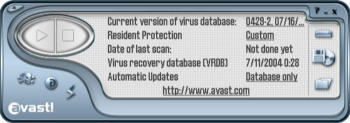
The Home version has just a "simple interface from which you can view status, initiate scans, set basic settings, and update the virus database. The Home version is free and just requires registration to use it beyond the 60-day trial period. The Professional version adds an "enhanced" interface option, which allows more detailed access to settings, and from which you can set up scheduled scans, which aren't available with the Home version. The Professional version costs $39.95 with one-year of updates, with discounts for 2- and 3-year terms. 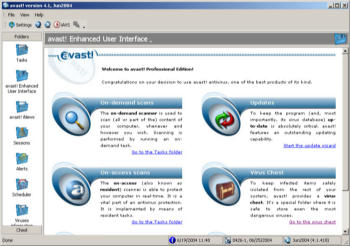 One setting I like is the ability to have it display the items it scans in real-time in the lower right portion of your screen. This can be separately configured for the different on-access protection providers. After turning this on for all the providers, I soon turned it off for the file access protection and script blocking, but left it on for e-mail scanning. Whenever something is being scanned the little system tray icon, which is a ball with the letter "a", rotates to let you know it's working. I appreciate this kind of subtle feedback. After trying avast! for a week or so I was impressed enough to purchase the Professional version as a replacement for Norton. That turned out to be a bit more of an adventure than I expected. From their Web site's purchase page you can click on a "buy now" button which takes you to the share-it! service. Things seemed pretty routine until I got to the part where I had to enter my e-mail address in order to receive a license key. I was informed that I couldn't use a "freemail account" (such as hotmail or yahoo). In fact that is the only type of e-mail account I use for e-commerce purposes. So I was initially deterred from purchasing this software program. I eventually regrouped and clicked on a different link for distributors and resellers and found some in the USA. They all seemed kind of like small-time operators that didn't particularly instill confidence in me to make the purchase with them. One I tried was about to send me to a site in China and warned me to click on the English link on that page. I decided not to go there. I finally wound up choosing the first reseller on the USA list, Rick "The Computer Guy". This site also seemed a little iffy with its "under construction" signs, but it would allow me to use any e-mail account I liked, so I threw a little caution to the wind and purchased it there. I got a nice confirmation e-mail telling me my credit card would be charged for the agreed amount, but I didn't have a license key yet to show for it. Fortunately a follow-up e-mail came the next day with the license key, and it actually did work. Whew! So would I recommend this antivirus program? I like it for myself and feel it would be suitable for someone who is computer-savvy enough, for example, to know how to look at their e-mail program's settings. For the computer novice I think something like Norton AntiVirus is probably more suitable. The purchasing experience was a bit more painful than it should have been for the Professional version, but that ultimately turned out well for me. You can always go for the Home version which, for non-commercial purposes, is completely free with registration. Also note that there are Linux and PDA versions of the program. Richard Corzo is a computer programmer who loves to tinker with operating systems. He has recently developed a fascination for the Mac OS, and has become leader of a revived DACS Mac SIG.. He can be reached at macsig@dacs.org |
|
Number 257 - October 2004
|
|