 Number 252 - May 2004 |





|
| New E-mail Strategy | |
|
by Jean Wilcox from the March 2004 Suncoast Beeper Images added by Bob Thomson | |
|
Editor's Note:
In the April 2004 TOGGLE Jean Wilcox wrote about how she "handles" SPAM. Here she provides more specific details on how to do it. While Jean deserves credit for this description, the elves at Microsoft who developed the software to accomplish these wonders also must be given some kudos. The followimg is excerpted from the March 2004 Suncoast Beeper. We have added the figures from our version of Windows XP hoping to make her comments even clearer. "I have finally settled on one that appears to be doing the job that way I want it done. This is not for everybody, I'm sure, because its usefulness depends upon how much spam one recieves on a given day. As I mentioned once before, I get lots of it - lots and lots, because I subscribe to many listservs and because I have allowed my name to be posted all over the tampa bay area as a contact for this user group. So it goes with the territory. "In the last of my previous attempts at controlling it my method depended upon making rules to keep spam out, or at least have ot deposited in the garbage. That didn'y work for me because it is too difficult for software to identify spam. The human eye is vastly superior. What I'm doing now is allowing anything at all to come in, yet specifying very particularly where it goes once it passes through the modem. I found that by making a separate rule for every single friend, family member, and trusted computer source, I can divide them neatly into two boxes, one of which I created for the purpose. The new one is called "Filtered", but any otherwise unused name would do as well. "If I create rules that specify that anything from my daughter or computer buddy or Microsoft or Verizon Wireless goes to the Filtered box, then all the crud drops into the old, normal Inbox by default. From there. I glance down the list of messages to see if anything is legitimate, and if not I can just delete the whole kit and kaboodle. When I see something that I have yet to make an entrance rule for. I drag it into the box with the good stuff. it is working wonderfully well for me but I must tell you that it is time consuming at the front end of the job. By the time you've used it a little while, it's time saving. You'll have to decide if it's worth it for you. First make your new folder, 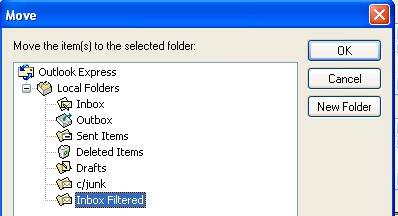
then: "A - Start with Inbox/Tools/Message Rules/Mail. Then select Mail Rules/New. "B - In box 1 choose "When the FROM line contains people" by making a check in the box. "C - In box 2, "Select the actions for your rule", make a check mark in "Move it to the Specified Folder". |
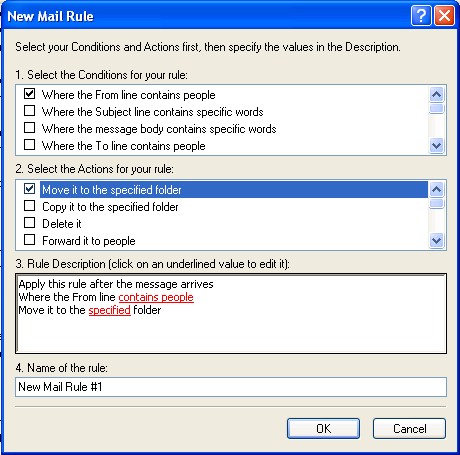
"D - Then in box 3, "Rule Description (Click the underlined value to edit it)", click on the underlined phrase, "Contains people". 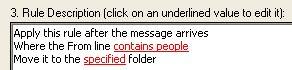
"E - When the next box opens up, click on Address Book and from there, select one of your correspondents by double-clicking it, and then OK. 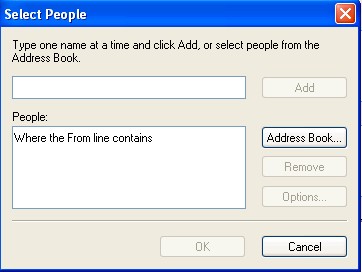
"F - That'll send you back to box 3, where you then click on the second underlined word, "specified", in the phrase. Move to the Specified folder". "G - At that point, a list of all your mail folders will appear, including the new one you have created for the occasion. Click that to select it, and then OK. You now have one rule for one person. What an ordeal. But it will get better from here on out. "Now that you have the precedent established, it goes a little more quickly. By the time you do all this three or four times, it's going very quickly since you're repeating everything at each step with the one exception of which name you select from the Address Book. Just work down the list. When you can't stand it anymore, just quit and do some more the next day. If your tolerance for redundancy is very low and you're not in a big hurry to finish, just make a few of them. After that, when a new message comes in from a source you'd like to protect, just select that message in the right pane of the browser, click Message at the top of the page (screen? -ed), Create Rule From Message from the pop-up, and box 1 will already be checked properly. All you will have to do then is check box 2, and finish up on the two items in box 3. By doing just a few a day, as your mail comes in, it ceases to be such a chore and you'll end up in the same place. It just takes longer. As I said, this is not for everybody, just obssessive/compulsive people like me." |
|
Number 252 - May 2004
|
|