 Number 246 - November 2003 |





|
| ScanDisk, Defrag and the Senile XT User | |
| by Bob Thomson, Tacoma Open Group for Microcomputers | |
|
A couple of months ago I wrote that for some reason defrag wouldn't work from the Run window in Windows XP, but that it seemed to run from the DOS C:\> prompt. Well let's just put that down to a senior moment. The computer was doing something, I'm just not sure what. Since then I have discovered --or maybe re-discovered--how to do it properly. Click on Mycomputer to get the display of disk drives and peripheral devices. 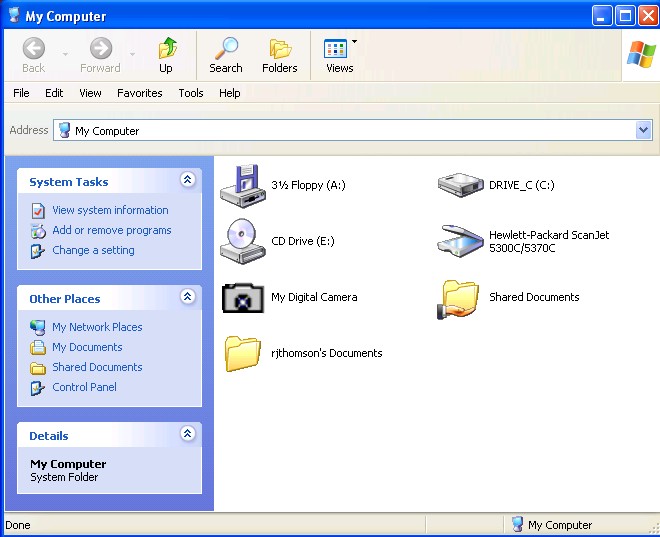
Right click on the Drive C: icon and select Properties from the menu of choices presented to bring up the following : 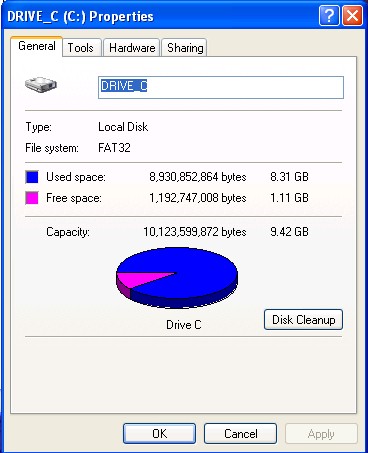
|
Note the tabs across the top, General, Tools, Hardware and Sharing. Click on Tools. Clicking on Tools results in display of the following screen display: 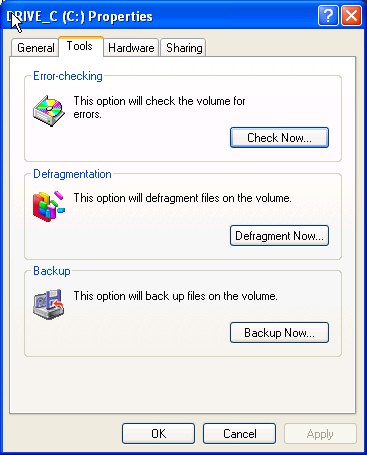
You are offered the choice of running Error Checking, Defragmentation, or Backup. The buttons in each block are labeled Check Now, Defragment Now and Backup Now. Pressing Check Now will begin the error checking (scandisk) operation. However, it will probably stop and tell you that some programs are running in the background. Mine did. It will then ask if you wish to run Error Checking on Startup the next time you start your computer. Click Yes and then restart your computer. During the restart cycle the machine will automatically run the operation selected (in this case Error Checking) BEFORE it loads all the background programs which you normally have it run on Startup. When it finishes its task it will then complete the startup process. Similarly, pressing Defragment Now will begin the defragmentation process the next time the computer starts. In this case the computer will first analyze the hard disk to determine the amount of fragmentation present. It will not continue with defragmentation unless the disk is more than fifteen percent (15%) fragmented. It suggests that you wait until that amount of fragmentation, or more, is present before trying to defragment. One way to do this, if you haven't already done it in preparation for the defragmentation process, is to delete all unneeded files before starting to defrag. Next I need to find out how to defrag my brain. Stay tuned! |
|
Number 246 - November 2003
|
|