 Number 244 - September 2003 |





|
| What is RAID? | |
|
Redundant Array of Inexpensive Disks. The term was coined in a paper by Patterson, Gibson and Katz in 1988
"While the capacity of Single Large Expensive Disks (SLED) has grown rapidly, the performance improvement of SLED has been modest. Redundant Arrays of Inexpensive Disks (RAID), based on the magnetic disk technology developed for personal computers, offers an attractive alternative to SLED, promising improvements of an order of magnitude in performance, reliability, power consumption, and scalability." The main idea of RAID is to provide a group of drives in a system that will continue to provide valid uninterrupted data even if one (or sometimes more) drives fail. Secondary benefits are faster access speeds and data transfer as well as the ability to publish virtual disk drives to the host system that are far larger than a single drive. RAID comes in several different configurations, which are notated RAID X, with X being a number. The most commonly used are RAID 0, RAID 1, and RAID 5, with RAID 3 and RAID 0+1 making occasional appearances. RAID 2 and 4 are almost never used. Each has its own strengths and weaknesses which I will now explain. RAID 0: Striping The first thing to realise with RAID 0 is that it doesn't provide redundancy, so by definition it isn't truly RAID. If even a single drive in a RAID 0 set goes faulty, then all of the data on the set is lost. However, RAID 0 does provide the fastest IO rates of the RAID levels. RAID 0 gets its performance from striping the data across all of the drives in the set. One way of explaining this would be to imagine a controller (connected to a group of drives) which spreads the data across all of the disks. Because it is sending data to several drives at once, it is able to do so quickly. The same is true for reading. Characteristics 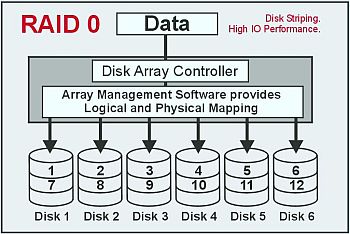
Recommended Use Video production and editing: Image editing: Prepress applications: Any application requiring high bandwidth. 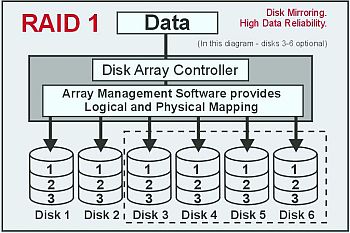
RAID 1: Disk Mirroring This is a very simple concept. Each drive has a complete mirror of itself on another drive. There is little or no performance benefit from using RAID 1, in fact, there can be a degradation to writes due to the overhead of error checking the data. Characteristics Recommended Use Accounting: Payroll: Financial: Any application requiring high availability. |
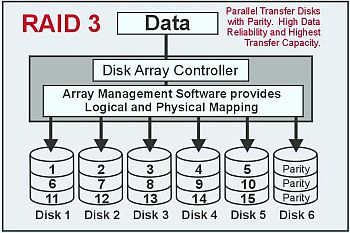
RAID 0+1: Striping and Mirroring This is striping and mirroring combined. Data is striped across several disks, each disk having a partner with exactly the same data on it. You get the benefits of fast data access as in RAID 0, with the fault tolerance of RAID 1. You need double the number of disks as a RAID 0, half for each side of the mirror. Characteristics Recommended Use Any application requiring both high bandwidth and high fault tolerance. RAID 3: Stripe with Parity RAID 1 required twice as many drives as normal to provide fault tolerance. This can be expensive. RAID 3 addresses this and requires one only extra drive to hold parity information. If a drive fails, the data can be reassembled using the parity information. The drawback is that this parity information has to be calculated, which takes time and processor power on the RAID controller. Characteristics Recommended Use Video production and live streaming:Image editing: Video Editing: Any application requiring high throughput and availability. 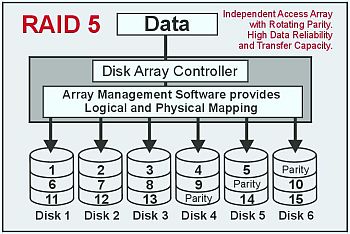
RAID 5: Striped Data, Striped Parity An adaptation of RAID 3, RAID 5 spreads the parity information across all of the drives instead of using a dedicated drive. This gives a performance benefit compared to RAID 3, where the dedicated parity drive is written to on every write operation. With RAID 5 this load is spread across all of the drives. This still only requires an overhead of one drive. RAID 5 is the most commonly chosen RAID configuration, giving fault tolerance and good performance. Characteristics Recommended Use File and application servers: Database servers: Intranet servers: Most versatile RAID level. About the Author This article is reprinted with kind permission from JAD Logic Ltd, a UK company of RAID experts www.jadlog.demon.co.uk/ The graphics, created locally, are based upon Accusys images. Reprinted from the June 2003 issue of PC Update, the magazine of Melbourne PC User Group, Australia |
|
Number 244 - September 2003
|
|