 Number 235 - December 2002 |





|
| Evaluating Web Pages | ||
|
by Vinny La Bash, vlabash@comcast.net, Sept 2002 Sarasota PC Monitor Sarasota Personal Computer Users Group, Inc. | ||
|
There are many reasons
for using the Internet. A primary one is to find useful, accurate,
unbiased information. However, when you think you've found what you're
looking for, can you trust it? How do you know that the information you
find is accurate, objective, up-to-date, or comes from a reliable
source? You can expect to find everything on the Web. You will encounter
sites that are downright silly, sites perpetrating hoaxes, frivolous
and serious personal pages, commercials, reviews, articles, full-text
documents, academic courses, scholarly papers, reference sources and
scientific reports. How do you know what's good information and what
isn't?
To use the Web effectively, you need to know the strengths and weaknesses of the Internet as a source of information and as a research tool. The Web is great for quickly finding basic factual information such as financial statistics, weather, sports results or how to write to your favorite movie star or sports celebrity. A big advantage is that it tends to be more up-to-date than print sources, making it an excellent resource for recent or breaking news stories. Don't think that we can now shut down the local library. Web sources tend to be of small value for genuine in-depth research. You won't find much copyrighted materials on the Web, not for free anyway. The full text of books, journals and similar materials simply don't exist on the Internet. A few older books in the public domain are available, but beyond that the most valuable information on any given subject will not be found on the Internet, so don't try to use the Internet as a substitute for serious library research. Use the Internet as a supplement to library research, and you can still find interesting sites with the right kind of information. Let's first try something mundane, though practical. Open your Web browser and go to Gas Price Watch 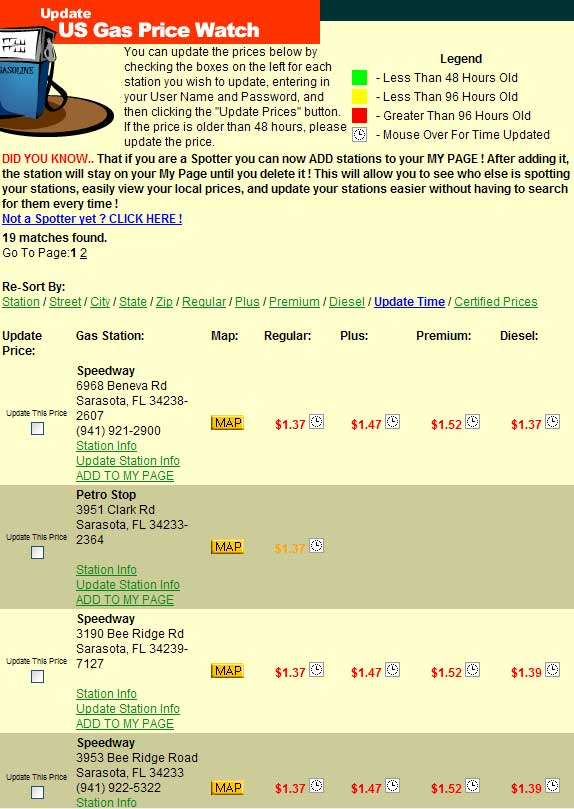
You now have a screen with a lot of detailed information, including locations that show the lowest fuel prices in your general area. Before you grab your car keys to get tanked up, let's take a few minutes to evaluate the data. Look at the Legend area in the top right of the page. This tells us how to determine the information's timeliness. Most of the prices in the illustration are represented by a clock icon, which the Legend tells us is information more than four days old. If you're in an unfamiliar city and driving a vehicle that uses diesel fuel, knowing where to get it can be more valuable than the accuracy of the price. Closer examination of the site reveals that prices are posted by "volunteer spotters." Accurate and timely prices will reflect the driving habits and dedication of the volunteers. Popular locations could be updated far more frequently than places off major thoroughfares. The Map button will show you exact locations, along with additional potentially useful information. In times of relative price stability, postings may stay accurate for weeks. If crude oil prices start fluctuating wildly, you may not be able to trust any post more than a day or two old. When using the Web for research, you must evaluate whether what you find comes from credible or objective sources. How does one tell if a Web page is informative and reliable? Start with the URL and What it Can Tell You! What type of domain does it come from? A site address ending in .edu means that the site belongs to an educational institute such as a major university or college. A good place for some online instruction on how to search for information on the Web is provided in the form of an outstanding Web-based tutorial on the New York University Website. You probably already know that .com sites are commercial in nature and probably trying to sell you something. That's OK as long as you know why you are on the site. Maybe you really do want to buy something. Web addresses ending in .org are normally hosted by non-profit organizations. That doesn't mean that they are free from bias or do not want to sell you something. Some folks sell ideas or ideology instead of commercial products. Who "published" the page? Usually, it's whatever or whomever comes between the http:// and the first /. Is it somebody's personal page or Web diary? A site like this may be of strong personal interest to the author, but rarely anyone else. Don't confuse the author of the information with the "Webmaster" or page designer unless it's a personal Website. Webmasters are hired to put the content on the Web. It's not their function to vouch for the accuracy of what the author provided. Who wrote the material? What qualifications does the author or organization have? Look for a name and email usually found at the bottom of the page or in a section called something like "About us" or "Contact us." If you can't find it, it probably doesn't exist. You may have to learn what you can by truncating elements of the URL. In the Address or Location Box, delete the end characters of the URL, stopping just before each / (leave the slash). Press enter to see if you can see more about the author or the nature of the site providing the page. Continue one slash (/) at a time, until you reach the first part, the domain name portion, which is the page's "publisher." Sometimes surprising information is revealed. When was the page updated last? Internet Explorer 6.x and above has a little known feature that you can use to determine when a Website was last changed. In the Address field type javascript:alert(document.lastModified). After you know the timeliness of the information, you would probably like to know what kind of change was made to the site or how much of it was updated. Is this important for what you want to know? Look at bottom of each individual page to tell if it has been changed independently of the rest of the site. Individual pages may be updated at different times, so you may need to look at more than one. Using Internet Explorer, right click on a clean area of a page and select Properties from the pop-up menu that appears. The resulting dialog box will tell you the day and date the page was created and last modified. If this is out of date, be suspicious of stale information. Is the date appropriate for the content? Is it old information on a time sensitive or evolving topic? Undated factual or statistical information is no better than anonymous information. Be inclined to distrust it. If the page claims to be from an established newspaper, journal, organization, institution or agency, is it the real one? Check if the domain name corresponds to the source. Look at Most companies and institutions own their own domain name. Check the owner of the domain name if in doubt. United States Government sites should be .gov, .mil or .us. Is it unmodified if it purports to be a reproduction, facsimile or excerpt of a published piece? It is too easy to copy and modify the content of a page and put it back on the Web with copies of the original logo, banners, credits and other information. What's the purpose of the page, and why was it created? Does it persuade or explain? Is it information or publicity? Determining the difference is often difficult and sometimes ends up being a judgment call. Who else links to the page? Do other reputable Websites reference their information or data? Look for awards or links to an "Awards" page from reputable directories and guides. Check out these references. Don't take any award at face value. Google or Alta Vista will show who else links to the page. Visit some of those sites to see what they say about the page in question. In Google or AltaVista, precede the URL by the term link: with no space after the colon. In the search box, type: Examine who sponsors the page. They may have a vested interest in the viewpoint presented. Advertisers can also be sponsors, and the points of view espoused could be designed to keep or attract advertisers. Look for links to other viewpoints. Lack of objectivity does not necessarily mean the site is full of lies, but you should consider what would be said if all points of view were represented. How seriously can you take the site? Is the tone of the page humorous, full of parody or exaggeration? Go to Evaluating the content of Websites is not always easy or straightforward. This kind of analysis requires careful thought, an unfamiliar exercise to some. If you use the Internet to find a stock quote, you won't need many of the cautions and critiques mentioned here. However, if you're trying to determine if Shakespeare is in reality a pseudonym for Edward de Vere, the 17th Earl of Oxford, you're going to need all the help you can get. Copyright 2002. This article is from the September 2002 issue of the Sarasota PC Monitor, the official monthly publication of the Sarasota Personal Computer Users Group, Inc., P.O. Box 15889, Sarasota, FL 34277-1889.
Number 235 - December 2002
| ||