 Number 204 - May 2000 |
| Ergonomics of Your Personal Computer Station | ||
|
by Marvin W. Eidinger, Tacoma Open Group for Micros from September 1994 TOGGLE | ||
|
Man's introduction to
machines of all sorts gives him the ability to experiment in ways never
thought of by those who have only the use of their physical bodies.
Some machines can make his life easier and some more difficult, and some
even harmful. We do get intrigued by the many endless opportunities
offered by our latest item, sometimes known as, the "mind" machine.
Yes, it is a real mind teaser and most of us enjoy the thrill of
conquering a small portion of its unlimited offerings. In fact, we get
so involved we forget about the detrimental health issues we may be
running into. Thus, the topic most of us have not been introduced to;
the ERGONOMICS OF YOUR PERSONAL COMPUTER STATION. "Ergonomics",
"Ergonomics", "Ergonomics", is this just another buzz word for the
computerist? We already have several mouthsful (sic) of computer-type
words that the ordinary man can hardly understand. Are we about to add
one more?
The word "ERGONOMICS" was first used in Europe just before the 1920's. The general use of "ergonomics" in the United States during the early 1980's made it sound like the latest buzz word much like "high-tech". Actually, it had been here since the early 60's, nobody thought much of it since--the phrase "human factors design", or "human factors engineering" was in common usage. The purpose of ergonomics is to perfect the unitizing of man with his machine so as to promote accuracy, speed of operation, and, during the same period, ensure the minimizing of fatigue, and negative health effects upon the human operator. Quoting the Webster Comprehensive Dictionary (Encyclopedic Edition, 1988), "ergonomics: The study of the relationship between man and his working environment, with special reference to anatomical, physiological, and psychological factors; human engineering." Now that I've got your attention, I would like to enlighten you with some key considerations, ideas, and worthwhile projects to make your short and long term computing comfortable, and, to assure the minimizing of your future health problems. There have been many articles in recent times about computer, word processor, and data entry operators having health problems resulting from employers' ignoring ergonomic issues in the work place. Be that as it may, you have the full control of these issues at your personal computer station. So, take the opportunity now to learn and then follow-thru (sic) with the necessary actions for your own benefit. Let me express to you what I found through my experiences in dealing with the ergonomic issues during the period 1981 thru 1984 (my present day observances indicate things haven't changed yet!!) of which the following were common examples: 1: Hundreds (even thousands) of dollars were spent on equipment, but only a few dollars toward an ergonomic (healthy) work station. 2: Witnessed situations: A: TNT classified ad taker sitting on a draftman's stool while typing on a word processer because the counter was orginally made for standing note writing. B: Boeing having computer on desk and the employee pulled out pencil drawer to place keyboard. C: Aurora Rental had operator facing visual display (monitor) with picture window to outside in the background. D: Several offices with overhead fluorescent lights with monitors reflecting same into the operators eyes. E: First Interstate Bank office (24th & Pacific) having their word processor operator using a standard stenographer's chair. F: Lighting effects on humans in various office situations. So now what does all this mean ? Getting to the "meat of the coconut", we can come up with some real design and layout considerations. If you were to follow them blindly, you won't be sorry even for one minute. Please don't skim over them, or I might later say "I told you so!" So here are the design and layout considerations broken down into four major parts. I. Height/distance of equipment support: (1) Set keyboard on surface which is 26" above floor. (2) Set visual display directly behind keyboard also at 26" (3) Set printer on separate surface that's 26 inches high. (4) Adjacent writing/reading surface to be 30 inches high. (5) Seat height: Allows forearm to be 90-deg to upper arm. (6) Angle [subtended from eye] from spacebar to top of screen 60-degrees max. [i.e. limit head movement] (7) Set monitor screen about 22 inches from eyes. (8) Data reading surface angled vertically and distanced the same as monitor (to your right or left). II. Miscellaneous support considerations: (1) Chair backrest must be firm. Steno chairs have flex joints and thus unacceptable. (2) Chairs must have 5 or more castered spider arms. (3) Left and/or right desk returns must be [at an angle of 120, not 90, degrees] in respect to front of keyboard. (4) Operator's legs must have freedom to swing from left to right, while facing keyboard, without hitting any obstruction. (5) All user's data disks and reference manuals must be readily accessible from keyboard operating position (within easy reach). (6) Front-to-back desk surface best if at least 24 inches. 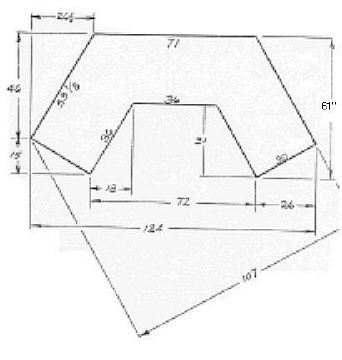
If you wish to build yourself one of these desks, capture the above figures by Right Clicking on the image, then Save Picture As [Directory:\Filename on your system]. Print the image from your saved file for a more readable image and working drawing. |
III. Illumination considerations:
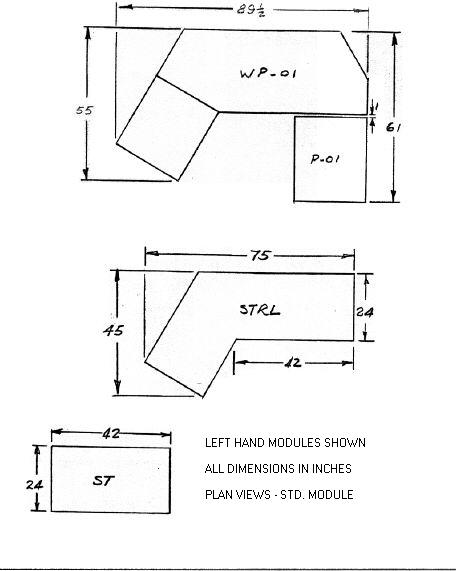
(1) General room to be dark except for monitor and an incandescent light or two on either side of keyboard position with the light rays angled away from operator and the visual display screen. (2) If fluourescent overhead lighting must be used, then full spectrum tubes (Vita Lites) are acceptable. IV. Odds and Ends: (1) Room wall colors must not be red, orange, dark blue, or purple. (2) After two hours at keyboard, take 10-minute break; i.e. walk, stretch, and any other exercising activity. Well, there you have it. Ignore the foregoing and your heading for eye strain, back pain, neck pain, and etc. The computer desk/work station plan views with their dimensions [shown below] have proved successful for years. Even though they are my designs, please feel free to copy them and enjoy your computing fun (or work) with a healthful ending. The details of the supporting legs are available from the author. [No longer! Marv is now deceased, but desk leg dimensions can be inferred from consideration of the points made in the article. As we have suggested elsewhere, the leg height can be made adjustable. - ed] To date, I have seen no commercially advertised workstations (computer stations), meeting the requirements I have so freely given above, so don't bother looking. SPECIAL NOTES: [Set the monitor on the desk surface.] Do not set monitor on top of computer's black box [i.e. CPU]. If easy access to floppy [or removable] drives is desired place to computer on its side [on the desktop. Or, if on the floor angled upward for ready accessibility - ed]. Also, if units are placed as outlined, no special glasses as advertised on TV will be needed.
|
|
|
Number 204 - May 2000
|


|
|