|
Add/Remove Quick Launch Toolbar

|
|
The "Quick Launch Toolbar" is located just to the right of the "Start" button.
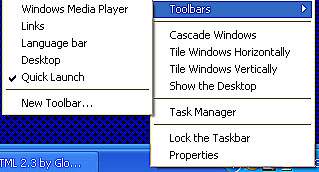
It launches applications with a single click. To add or remove the Quick Launch Toolbar,
right click on a blank area of the tool bar and highlight "Toolbars". Then either check or uncheck
"Quick Launch".
|
|