 Number 194 - July 1999 |
| Home Area Network (HAN) | ||
| by Bob Thomson, Tacoma Open Group for Microcomputers | ||
|
Recently I became
intrigued with the idea that the telephone cable already installed in my
home, with phone jacks in almost every room, could be used to connect
two or more computers together in a Local Area Network, or what is now
being called a Home Area Network. A few months ago I heard/ read/
whatever that a company, named Boca Research, offered such a system but I
was unable to find a mailing address for them to follow it up. The
other day, after becoming Internet-enabled, I discovered that not only
Boca Research but Intel also has a product, listed on their website,
which uses installed household telephone wiring. So I searched the
Internet for Boca Research and found their Internet site as well. Both
sites quote their support for, and compliance with, the Home Phoneline
Networking Alliance (HPNA). At the HPNA website I discovered that ZOOM
and BestData also have similar HAN products that use installed home
phone lines and meet HPNA standards.
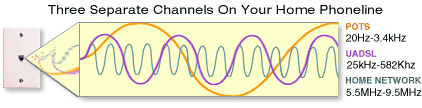
Since I planned to glean data from the vendor sales pitches to get HAN details for your edification as well as mine, I thought that I had better see if there were even more competitors offering the same or similar products. The only other company I found was Terk HomeNetwork a/v. However, Terk's area of interest is in using the existing phone lines to transmit audio/visual (television) signals throughout the house--not quite the same thing. A home area network (HAN) allows you to link your home PCs without the expense or mess of installing network cabling (i.e. No cable runs to plan, no holes to drill or system cable terminations to install.) There are also wireless systems available, but discussion of those is for another time. The hard-wired HAN using phone lines is simpler and less expensive. All four vendors offer a HAN which requires that a PCI card be installed in each machine. However, Intel also offers an alternative external device which plugs into the parallel port. Both internal (PCI) and external (parallel port) types then use a simple telephone cable with existing phone jacks to set up your home network. Plug the HAN cable into PCI Card or external adapter and your wall-mounted phone jack and you're ready to share files, printers, modems and other peripherals from any HAN-system-equipped PC in your home. Each product comes with software (on CD-ROM) for modem/Internet access sharing among computers on the network and numerous other Internet and network utility software packages. And you can still use your phone lines to make phone calls or connect to your ISP while simultaneously connecting to your home network. Thus every telephone jack is a home network port. Frequency division multiplexing allows sharing of existing wiring with telephone, Fax, analog, ISDN, xDSL, or cable modem services. Performance: All products claim a throughput of 1 Mbps up to 500 feet between nodes and are compliant with HPNA standards. Frequency The HAN operates at a specific frequency range on the phone lines, allowing the home network to share the line with other services like voice calls, fax transmissions and high speed universal asynchronous digital subscriber lines (UADSL). Phone line-based home networks operate in the frequency range of 5.5 MHz to 9.5 MHz. Voice is carried in the 0 to 4 KHz range (POTS). UADSL frequencies are in the 25 KHz to 582 KHz range. High data error rates, may require a filter in the line to the phone. See http://www.homepna.org/docs/fieldtr1.pdf
POTS = Plain Old Telephone System |
Software:
Each machine must be running Windows 95 (OSR2 or higher), Windows 98 or Windows NT 5.0, and compatible installation software including any drivers required including Plug and Play installation. System Requirements: Pentium 100 Mhz or higher, CD-ROM drive, hard disk with 40 MB available, 16 MB RAM or higher, PCI slot available, or Parallel port available (Intel) Boca Research Each adapter (PCI Card) package includes a CD-ROM containing easy-to-use, wizard driven installation software, a free copy of Midpoint Companion Lite software for modem/Internet access sharing. The PCI adapter includes the ability to install Boca HAN with either one or multiple phone lines. Boca Research Prices: HAN Kit (HLKTP01) $109.99 HAN Card (HLTP01) $59.99 Intel Intel's principal pitch is for their AnyPointTM HomeNetwork parallel port device. They also offer a separate PCI card containing a telephone jack. The parallel port device is about the size of a large TV channel changer, it is on display ay CompUSA in Tacoma. It contains both male and female parallel cable receptacles, presumably so you can daisy chain a printer, for example, 2 phone jacks, one to your phone, one to the wall jack and some indicator lights. If you visit to their website you can view a picture of the device. The parallel port models connect by cable to each PC's parallel port and then by telephone cable to a nearby wall phone jack. Included software handles communication between the PCs and the Internet. With the AnyPoint HomeNetwork installed you can simultaneously access files, surf the Internet (if you have an Internet Service Provider Account), print documents and play multi-user games--from any PC in your home. Intel Prices: 2 PC Parallel Kit = $189.00 to hook two PCs with parallel ports 1 PC Parallel Kit = $ 99.00 add one PC w/parallel port to network 1 PCI Card Kit = $79.00 add one PC with PCI slot to the network It is certainly conceivable that you might have one PC with a parallel port and one PCI-capable PC in a network. BestData BestData's Home PCLink Kit includes: One Home PC Link Gateway Card with built-in 56k V90 modem, one Home PC Link Station Card [PCI], User manual, two 6 foot telephone cables, free Data/Fax communications software, CD-ROM with free on-line service offers BestData Prices: Home PC Link Kit $129.99 Home PC Link Internet Gateway Card $99.99 Home PC Link Station Card $49.99 ZOOM With the two user version of Sygate 3.0 you can simultaneously use one Internet account through a single analog modem, ISDN, xDSL or cable modem. ZOOM Prices: ZOOM did not seem to have their pricing well-defined. Their website statement merely said "Estimated retail price of less than $50." Presumably that is for each computer in the network. Considering pricing by the others it's an iffy fifty. Websites: http://www.bocaresearch.com is Boca Research's home page http://www.intel.com is Intel's home page http://www.bestdata.com is BestData's home page http://www.zoom.com is Zoom's home page |
|
|
Number 194 - July 1999 |
||